Fake YouTube comment examples
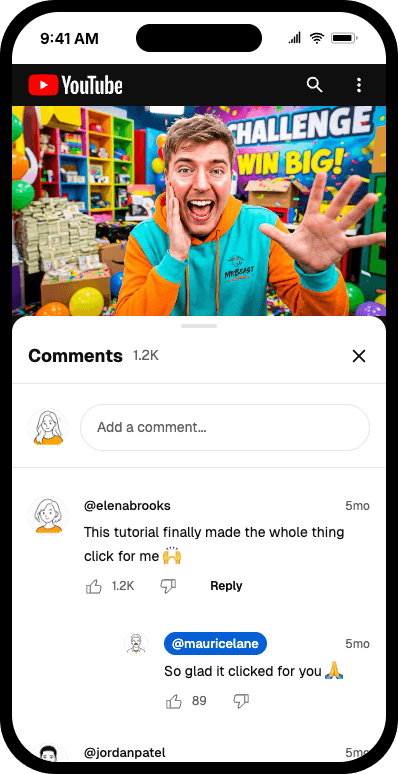
Real exports made with Mockly: a clean screenshot, a comment section in a device frame, and dark mode. Click any example to view it full size.
Clean screenshot
Export the whole comment section — video, avatars, likes and replies — with no phone frame.
Try it out
Why use a YouTube comment mockup?
A YouTube comment mockup is useful when the proof should feel public, creator-facing, and tied to a video. It works for thumbnails, pitch decks, social proof, moderation examples, and creator education because the format instantly signals audience reaction.
The strongest YouTube comment screenshots use specific details: realistic usernames, like counts, replies, pinned or hearted comments, and short comments that sound like actual viewers instead of polished ad copy.
YouTube comment mockups are best for
Pick the format that matches the situation instead of defaulting to the most obvious app.
Creator and audience proof
Use YouTube comments when you need public audience reaction under a video, not a private message or testimonial card.
Pitches and campaign reports
Comment screenshots work well in creator decks, sponsorship pitches, and campaign recaps because they show viewer sentiment quickly.
Training and moderation examples
Teachers, moderators, and product teams can create fictional comment examples without exposing real users.
Details that make YouTube comments believable
These are the cues that make this mockup format feel native instead of generic.
Engagement cues carry the story
A pinned comment, creator heart, verified badge, or reply thread can explain the whole context faster than extra text.
Viewer voice should sound real
Real comments are usually short, reactive, and uneven. Too-perfect copy makes the screenshot look staged.
Metrics need believable scale
Like counts and replies should feel plausible for the channel size and the claim you are making.
Public context matters
YouTube comments are public proof. If the story is private feedback, use a chat or DM mockup instead.
Real-world YouTube comment examples
Use cases beat generic claims. These are the kinds of examples people actually build with this format.
Viewer reaction screenshots
Show viewer reactions to a creator launch, tutorial, music video, product announcement, or sponsored segment.
Creator sponsorship decks
Build comment proof for a sponsorship deck, brand pitch, or post-campaign report without leaking real usernames.
Education and moderation
Create fictional comments for media literacy, community moderation, or creator education examples.
Common mistakes
Most weak mockups fail on context, not styling.
- 1
Writing comments like ad copy
If every comment reads like a testimonial headline, the screenshot feels fake immediately.
- 2
Using implausible engagement
Huge like counts on tiny comments, or no replies on a supposedly viral thread, can break credibility.
- 3
Using public comments for private proof
A YouTube comment mockup is the wrong format when the proof is private customer feedback or a support conversation.
YouTube comment workflow template
Use this workflow when you need a YouTube comment screenshot for creator content, social proof, or training examples.
Starter template
Use case: creator sponsorship proof
Video context: product tutorial
Comments: 4 viewer reactions + 1 creator reply
Tone: specific, casual, not overly polished
Realism detail to include: one pinned or hearted comment
- 1
Decide the video context: tutorial, launch, review, sponsorship, or moderation example.
- 2
Write 3-5 short comments with distinct viewer voices.
- 3
Add replies, likes, pinned state, or creator hearts only where they support the story.
- 4
Check that engagement numbers feel plausible for the channel and claim.
- 5
Export a clean screenshot for thumbnails, decks, docs, or social posts.
When YouTube comments are the right format
Use the right mockup type for the proof you want to show.
"Mockly manages to set itself apart while iterating on such a popular idea by simply being usable."
You're in good company
30,000+
Creators, marketers, and production teams use Mockly for realistic mockups that do not depend on live app screenshots.
One editor. 40+ apps. Still image or video when the story needs motion.
Try other comment mockups
Explore the same realistic styling on the apps your audience already knows.
Fake Facebook comments
Read about the Facebook comments generatorFake Instagram comments
Read about the Instagram comments generatorFake LinkedIn comments
Read about the LinkedIn comments generatorCreate perfect YouTube Comment Screenshots with Mockly
Make comment section mockups that look native to each app.
Realistic Comment Interface
Perfect replica of YouTube's interface including usernames, verified badges, and engagement metrics.
Custom Users & Comments
Add custom users with profile pictures, verified badges, and creator badges for your comment mockup.
Full Customization
Control every aspect including likes, replies, author-liked indicators, and pinned comments.
High-Quality Export
Export your fake comment screenshots in high resolution, perfect for presentations and social media.
Need the full Mockly workflow?
Sign up free to keep your mockups in one place, export clean files, and turn still mockups into motion when the project needs more than a static image.
Create your YouTube comment mockup in 4 easy steps
Most people have their first mockup ready in under a minute once they know which format they need.
Choose App
Select from YouTube, TikTok, Instagram, X, and other apps.
Set Up Users
Add users with names, profile pictures, and verification badges.
Write Comments
Add comments, replies, likes, and customize engagement metrics for your comment mockup.
Export & Share
Download your fake comment screenshot as a high-quality image and share it anywhere.
Ready to create your first YouTube comment mockup?
You can start Mockly for free. No strings attached.
Loved by Creators, Designers, and Marketers
Whether you're making memes or client decks, same tool, same editor.
Social Media Content
Create engaging chat screenshots for Instagram stories, TikTok videos, and Twitter posts. Perfect for memes, jokes, and viral content.
Design Mockups
Showcase your app or service in a realistic chat context. Perfect for portfolio presentations and client proposals.
Marketing Campaigns
Create compelling customer testimonials and social proof. Show how people talk about your brand naturally.
Personal Fun
Create funny conversations with friends, plan pranks, or just have fun with creative storytelling through chat.
Specific details
What this page covers
YouTube comment details
Replies, likes, dislikes, pinned comments, creator hearts, verified badges, and sort options.
YouTube use cases
Built for thumbnails, pitch decks, social proof examples, and education.
Related pages
Keep building from here
Jump to the closest hub, editor, or guide for this mockup type.
YouTube comment mockups
Create YouTube comment mockups with replies, likes, hearts, and pinned states.
YouTube comment examples
Example-led YouTube comment mockup ideas.
All mockup types
Compare YouTube, Instagram, TikTok, Facebook, X, and Threads comments.
Device frame mockups
Add phone context with status bars, frames, and device controls.
Got questions?
Common questions about YouTube comment mockups.
"Replaced three different tools with Mockly. The video export alone saved me hours every week on client presentations."
Ready when you are
Ready to create fake YouTube comment screenshots?
Used by creators and marketers who need comment mockups that look authentic.
No credit card required