
Why Facebook Mockups Have Their Own Rules
Facebook content has a texture no other platform has. It's neighborhood drama, small-business milestones, aunts typing in full sentences, and comment sections that turn into soap operas. That texture is exactly why Facebook screenshots travel so well as content on other platforms. A good Facebook exchange screenshotted onto TikTok or X is a whole genre.
A Facebook mockup lets you write that drama yourself: the post, the reactions, the comment thread, the one reply that gets 4x more likes than the original comment. This guide builds both halves (posts and comments) in Mockly, and covers what makes each believable.
Fictional neighborhoods only
Facebook mockups are for entertainment, ads, tutorials, and course material with invented people. Don't fabricate posts from real accounts or frame a mockup as a genuine screenshot of a real person.
The Anatomy of a Believable Facebook Post
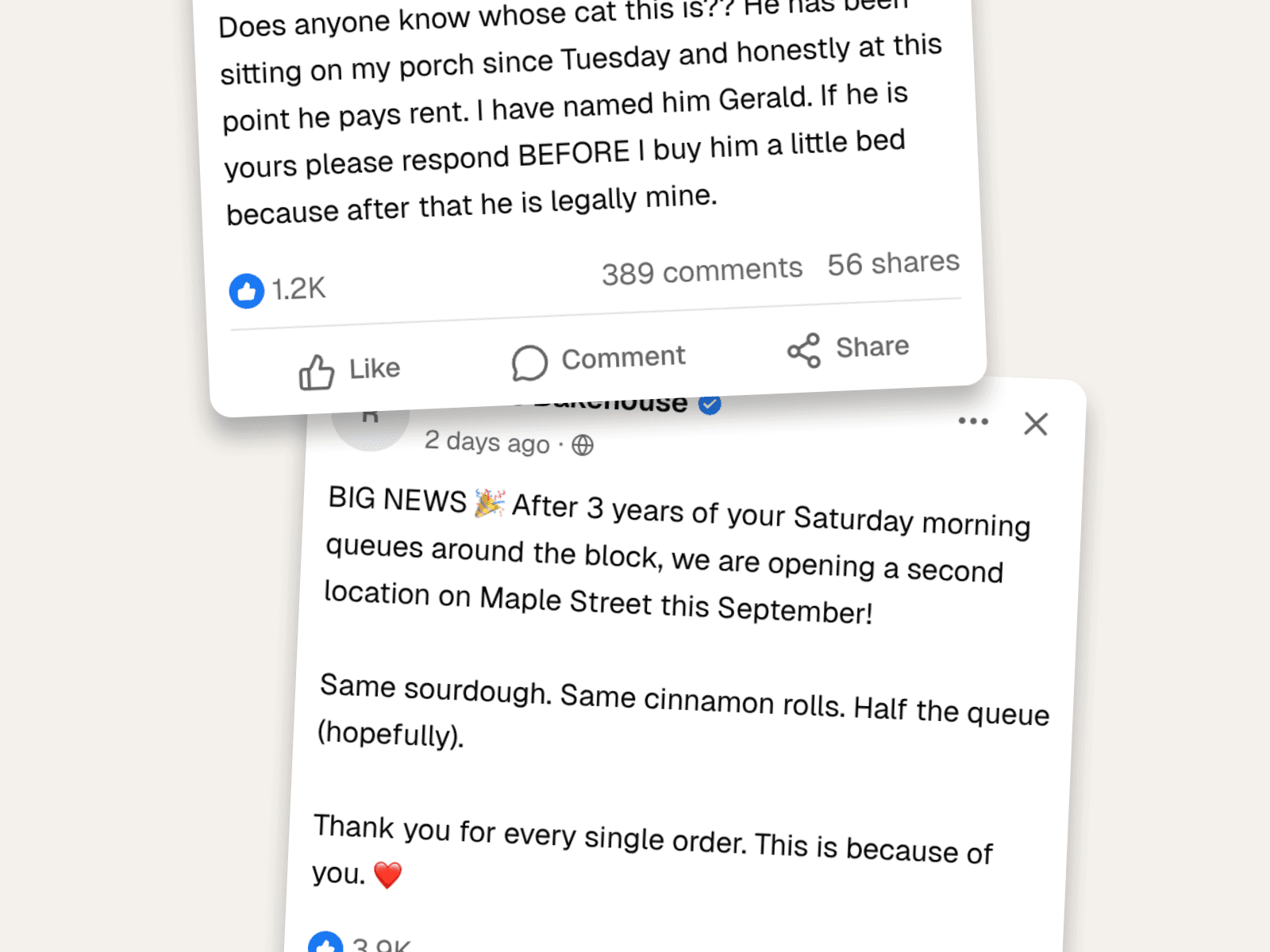
- Reactions, comments, shares: three different numbers. The blue thumb with "1.2K", then "389 comments" and "56 shares" right-aligned. Their ratio tells the story. Neighborhood drama gets comments, business news gets shares.
- "2 days ago · 🌐". The timestamp plus the public-audience globe. Tiny, and everyone's brain expects it.
- The Like / Comment / Share row. The full-width action bar below the counts is part of Facebook's signature.
- Longer text is normal here. Unlike X, Facebook posts breathe in full sentences and multiple paragraphs. Don't compress the voice.
Example 1: The Neighborhood Drama Post
The genre Facebook was born for. A confused neighbor, an escalating situation, a cat named Gerald.
Why it reads as real:
- Full-sentence chaos. Double question marks, a legal theory about cat ownership, ALL CAPS on "BEFORE". This is Facebook's native register.
- Comments outnumber shares 7 to 1. Drama makes people talk, not share. The ratio is the realism.
- A regular name, no badge. Linda Kowalski is every community group. Don't over-produce the author.
Example 2: The Small-Business Announcement
The post every local business dreams of writing, and the mockup every agency pitch deck needs when the campaign hasn't launched yet.
The craft:
- Shares are high. 284 shares on 3.8K reactions. Good news travels; that's what sharing is for on Facebook.
- Paragraph breaks with an emoji opener. 🎉 up top, ❤️ at the close. Small businesses write exactly like this.
- Gratitude beats promotion. "This is because of you." The announcement is about the customers. That's why it would go viral, and why the mockup feels true.
The Comment Thread: Where Facebook Actually Happens
Half the value of a Facebook mockup is the comments. Mockly's Facebook comment editor renders the thread: nested replies, like counts, the "View 387 more comments" line.
What makes a comment thread land:
- The reply out-likes the comment. Barb's claim: 214 likes. Linda's comeback: 892. The like counts are the audience laughing.
- First names in replies. "Barb he told me…". Facebook regulars address each other like family at dinner.
- One bystander comment. "following this for updates on Gerald". Every viral thread has the audience-member comment, so include one.
- The "View 387 more comments" line matches the post's comment count. Details that agree with each other are what make a fake cohesive.
How to Build One in Mockly
- Write the post in the Facebook post editor: author, text, timestamp, and the reactions/comments/shares counts.
- Build the thread in the Facebook comment editor: add commenters, nest the replies, set like counts that tell the story.
- Keep the numbers consistent across both if you'll show them together.
- Export. Clean PNGs, up to 4K and watermark-free on Premium. Try it free, no signup needed, and see the plans.
Common Mistakes to Avoid
- X-style writing. Lowercase minimalism reads wrong here. Facebook talks in full sentences with real punctuation.
- Reaction ratios that don't match the genre. Drama is comments-heavy. Good news is shares-heavy. Ads are suspiciously balanced.
- Everyone's reply getting equal likes. The comeback gets the likes. Distribute them like a punchline.
- Missing the globe icon energy. Public posts, community groups, "2 days ago". The context markers do half the storytelling.
Related Guides
- How to Make a Fake Messenger Chat
- How to Make a Fake Tweet
- Instagram Comment Generator Guide
- The Psychology of Social Proof
- Complete Guide to Fake Screenshots
FAQ
Can I make a fake Facebook post for free?
Yes. The Facebook post editor is free to use, no signup needed. Your first export is free, and a free account adds 3 more. Premium adds HD/4K and watermark-free export.
Can I create the comment section too?
Yes. The Facebook comment editor builds full threads with nested replies, like counts, and the "view more comments" line.
Can I set reactions, comments, and shares separately?
Yes, all three counts are independent. That matters, because their ratio is what makes a post read as drama, news, or an ad.
Does it work for Facebook groups content?
The post renders in Facebook's feed style, which covers most group-drama storytelling. Pair it with the comment thread for the full effect.
Is it OK to make fake Facebook posts?
For fiction, comedy, ads, and teaching, yes, with invented people. Impersonating real accounts or passing mockups off as genuine screenshots is not what this is for.
Start Creating
Write the neighborhood drama or the milestone post your content needs. Open the Facebook post editor, and don't forget the comment section. That's where the story lives.
Try it yourself
Create your first mockup in under a minute
40+ apps. Free to try, no signup needed.
Start your mockupAbout the author
Elena Brooks
Content Editor
Elena writes step-by-step tutorials and practical guides for creating realistic chat and social mockups. She focuses on helping creators quickly turn ideas into polished visuals that look believable in demos, landing pages, and client work.
Tags
More from the blog
TikTok Comment Template: Voice Comments, Polls and Replies
Make TikTok comment mockups with voice comments and creator polls, plus the Creator badge, replies and heart counts. Free to try, no signup needed.
How to Make a Fake Messenger Chat (Facebook Messenger Guide)
Make fake Facebook Messenger chats that look real: the Active now header, blue and purple bubbles, dark mode, and group chats. Two worked examples you can copy, plus the details people check.
How to Make a Fake Tweet | X Post Generator Guide
Create fake tweets that look real, with verified badges, engagement numbers, timestamps, and 4K export. Three X post mockups you can copy, plus the details that sell them.