
TikTok Comments Are Content
On TikTok, the comment section isn't below the content. It competes with it. Creators reply to comments with whole videos. Funny exchanges get reposted across every app. "Reading your comments" is a format of its own.
Which means creators constantly need comment sections they can control: to reply to in skits, to use as video overlays, to show in tutorials without exposing real usernames. That's what a TikTok comment mockup is for.
And in September 2026 the comment section got new formats. People can now leave voice comments, creators can post polls in their own comments, and anyone can attach up to nine photos. The TikTok comment editor in Mockly now renders voice comments and creator polls, so your template can keep up with the real thing. This guide covers both, plus the details that make a thread pass the scroll test.
Fictional commenters only
Comment mockups are for skits, tutorials, and content with invented users. Don't fabricate comments from real accounts, and don't manufacture fake praise for real products. Social proof works precisely because people trust it.
What Changed in TikTok Comments (September 2026)
TikTok announced four new comment formats on 3 September 2026 (TechCrunch has the rollout details):
- Voice comments. Tap the mic in the comment box and record up to 60 seconds. Anyone can tap to listen, and TikTok transcribes the audio so the text sits under the play button. Rolling out to accounts 18 and older.
- Comment polls. Creators can add a poll when commenting on their own video, with up to five options. Results update in the comment section as votes come in.
- Photo carousels. Up to nine photos in one comment, rolling out over the month after launch.
- Live Photos. A short burst of motion before the still image.
Mockly renders the first two: voice comments and creator polls. Photos and Live Photos aren't in the comment editor.
The Anatomy of a Believable TikTok Comment Section
- The "4.2K comments" header with the close X. This is a bottom sheet over a video, and the framing says so.
- The Creator badge. When the video's author replies, their comment carries the pink "Creator" tag. It's the single most important detail for reply-skit formats.
- Hearts on the right, counts below. TikTok's like column is right-aligned with abbreviated counts (12.4K, not 12,400).
- The voice pill. A play button, a waveform, the length ("0:09") and the transcript underneath. The transcript is what people actually read.
- The creator poll. The question as the comment text, up to five options with percentages, and a footer with the vote total and "Final results" or "Ends in".
- The emoji quick-bar and "Add comment…" field. The bottom chrome is part of the signature, so leave it visible.
- Comment-section dialect. TikTok comments have their own grammar: "the way you just…", "nobody talk to me", "day 4 of asking". Study the genre; the writing is most of the realism.
Worked Example: The Creator Reply
The format that powers reply videos: a top comment teeing up the creator's comeback.
What's doing the work:
- The reply out-hearts the comment. 48.2K on the creator's comeback vs 12.4K on the setup. On TikTok, the reply is the performance and the like counts show the audience knows it.
- The Creator badge sits on the reply, nested under the original comment. That structure is the whole format.
- The other comments are audience noise. "nobody talk to me I'm making this tonight" and "day 4 of asking for the sauce recipe": the recurring characters of every food-TikTok comment section.
- The header count (4.2K) dwarfs the visible thread. You're seeing the top of a big pile, exactly like the real sheet.
Worked Example: The Creator Poll
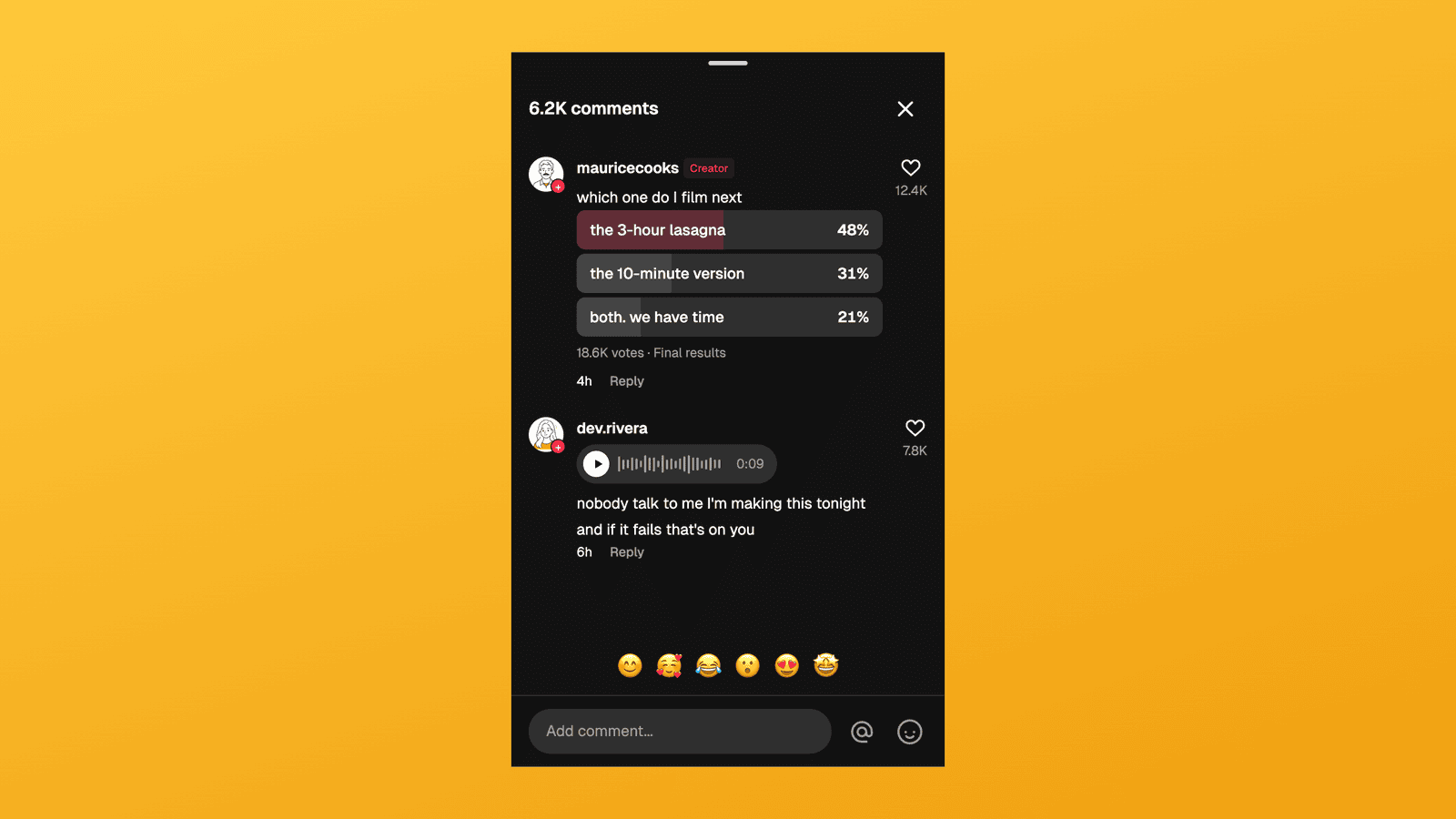
A food creator asks the comments to pick the next video, and the comments answer.
What's doing the work:
- The poll sits on the creator's comment. Only the creator can post one on TikTok, so the Creator badge is what makes it believable.
- One option wins by a margin. 48% against 31% and 21% reads like a real crowd. A 34/33/33 split reads like a spreadsheet.
- The vote total dwarfs the likes. 18.6K votes on a comment with 12.4K hearts. Voting is cheaper than liking, and real polls show it.
- "Final results" closes the story. The drama is over, and the next video is the payoff. Switch the poll to open with "Ends in 2d" when the video is the cliffhanger instead.
Worked Example: The Voice Comment
A voice comment is a rant you can hear. The transcript lets everyone else read it.
Up close, the pill carries the play button, the waveform and the length, with the transcript underneath:
What's doing the work:
- 0:09 is long enough to be a rant. Short enough that people press play. The length should match the transcript: about two words per second.
- The transcript reads like speech. No capital letters, no full stop, a run-on sentence. People don't punctuate when they talk.
- The reply reacts to the audio. "the confidence in this voice note" only makes sense for a voice comment, and the creator's reply out-hearts it.
- The rest of the thread quotes it. "the way she said 'that's on you'" tells you the voice comment is the main event.
Where Creators Use These
- Reply-video skits. Write the comment you want to respond to, export it, and film the response. That's the workflow of half of TikTok, minus waiting for the right comment to arrive.
- Video overlays. The comment appears on screen while you talk. A mockup means no real user's handle in your content and no permission headaches.
- Poll-result reveal videos. Show the closed poll, then make the winning option.
- Reacting to a voice comment on camera. Put the voice pill on screen and react to what it "said".
- Tutorials and courses. Teaching TikTok marketing means showing comment dynamics, with example threads you own.
- Cross-app content. Funny TikTok comment mockups for X, Instagram, and newsletters, written to fit your bit exactly.
How to Build One in Mockly
- Open the TikTok comment editor.
- Set the creator (name, username). Their comments and replies get the Creator badge automatically.
- Add commenters and write the thread. Nest replies where the format needs them; keep the dialect native.
- Add a poll. Click a creator comment, switch it to Poll, write the question, then set the options and vote counts. Pick Open with an "Ends in" time, or Final results.
- Add a voice comment. Click a comment, switch it to Voice, set the length in seconds and write the transcript.
- Distribute the hearts and set the header count. The funniest line gets the most; the header count should be bigger than the visible thread.
- Export. A clean PNG, up to 4K and watermark-free on Premium. See the plans.
The same comment editor covers YouTube, Instagram, X, Reddit, Facebook, LinkedIn, and Threads. Voice comments and polls are TikTok only.
Common Mistakes to Avoid
- Missing the Creator badge on the author's reply. It renders automatically in Mockly, but if your fake was made elsewhere, its absence is the tell.
- A poll on a non-creator account. On TikTok only the creator can post a poll. Mockly won't stop you, so check who's posting it.
- Percentages that don't add up. Mockly works them out from the vote counts and rounds them to 100 for you. Typed by hand, they rarely do.
- A 60-second voice comment with a five-word transcript. The length and the text have to match.
- Formal writing. "This recipe looks delicious!" is a Facebook comment. TikTok says "oh this is DANGEROUS information".
- Even like counts. 1K/1K/1K reads as generated. Real sections have one runaway winner.
- A tiny header count. Three visible comments under "12 comments" feels dead. The sheet should imply depth.
Related Guides
- YouTube Comment Generator Guide
- Instagram Comment Generator Guide
- The Psychology of Social Proof
- Chat Video Generator for TikTok Storytelling
FAQ
Can I make fake TikTok comments for free?
Yes. The TikTok comment editor is free to use, no signup needed. Your first export is free, and a free account adds 3 more. Premium adds HD/4K and watermark-free export.
Can I make a fake TikTok voice comment?
Yes. Click a comment, switch it to Voice, and set the length from 1 to 60 seconds. The comment text becomes the transcript under the waveform.
Can I add a poll to a TikTok comment mockup?
Yes. Switch a creator comment to Poll and add 2 to 5 options with vote counts. Percentages update as you edit the votes. Show it as open with an "Ends in" time, or as Final results.
Can I add photos to a comment?
Not in the comment editor today. Mockly renders text, voice and poll comments.
Does the Creator badge show up?
Yes. Comments from the account you mark as the post author automatically carry the pink Creator badge, exactly like the real app.
Can I nest replies?
Yes, comments support nested replies with their own like counts and timestamps, the structure reply skits are built on.
Is it OK to use fake comments in my videos?
For skits, tutorials, and clearly creative formats with fictional users, yes. It's standard practice. Fabricating comments from real people or fake reviews for real products is the line you don't cross.
Start Creating
Write the comment your next reply video deserves. Open the TikTok comment editor and build the thread in minutes. Free to try, no signup needed.
Try it yourself
Create your first mockup in under a minute
40+ apps. Free to try, no signup needed.
Start your mockupAbout the author
Elena Brooks
Content Editor
Elena writes step-by-step tutorials and practical guides for creating realistic chat and social mockups. She focuses on helping creators quickly turn ideas into polished visuals that look believable in demos, landing pages, and client work.
Tags
More from the blog
How to Make Fake Instagram DM Screenshots | Free Generator 2026
Create realistic fake Instagram DM screenshots for free online. Perfect for influencer marketing, brand collaborations, and social media content. No download required.
WhatsApp Username Chat Mockups: The @Handle Header (2026)
Make a WhatsApp chat mockup with the @username header. What the 2026 username rollout changed, what stayed, and three examples you can copy. Free to try.
How to Make a Fake Messenger Chat (Facebook Messenger Guide)
Make fake Facebook Messenger chats that look real: the Active now header, blue and purple bubbles, dark mode, and group chats. Two worked examples you can copy, plus the details people check.