

Why Workplace Chats Are the Best B2B Social Proof
A five-star review says a customer was happy. A Slack message that says "Northwind just renewed for 3 years, their ops lead said onboarding was the first one that didn't need a consultant" says something a review never can. It shows the moment. It has a name, a time, a channel, and a colleague reacting. It reads as overheard rather than staged.
That is why Slack and Microsoft Teams screenshots have quietly become the go-to format for B2B marketing: launch recaps, customer-win posts on LinkedIn, case study headers, sales decks, and product demos that need a believable "how teams use this" moment.
The problem is that real workplace chats are full of things you cannot publish. Customer names, internal numbers, a colleague's off-hand joke. So marketers rebuild the moment as a mockup: a real quote, with permission, typeset into a clean Slack or Teams thread with the sensitive parts swapped out. This guide shows three of those, built in Mockly's Slack generator and Teams generator.
Mockups, not fabrications
The quote is real. The permission is real. The names, channel, and timestamps are the mockup. Never invent a customer, a result, or a quote, and never present a mockup as a screenshot of a real conversation. If the customer would not recognize the words, do not use them.
What Makes a Slack Screenshot Look Real
Your audience uses Slack all day. They notice when a "Slack" screenshot is a chat bubble app with a purple header. Slack does not have bubbles. Here is what it does have:
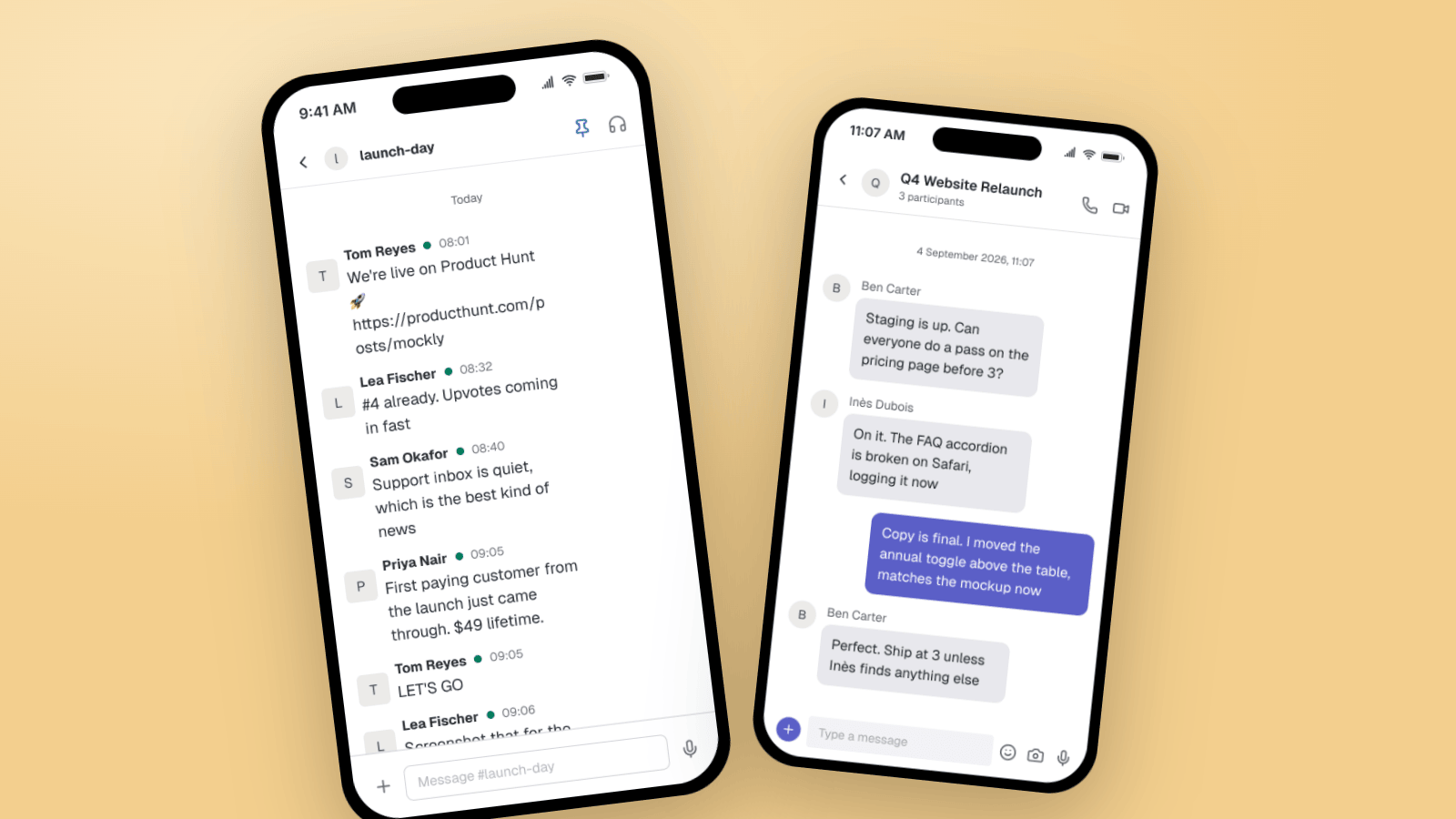
- Flat, left-aligned rows. Every message is an avatar, a bold name, a green presence dot, a small timestamp, then the text below. No bubbles, no left-right split.
- A channel header with a # prefix. "# customer-wins" with a pin icon and a headphone icon on the right.
- Grouped messages. Two messages in a row from the same person share one name and avatar.
- The input bar follows the channel. "Message #customer-wins", with a plus on the left and a mic on the right.
- Dark mode is common. A lot of Slack power users run dark. It also looks better on a dark LinkedIn post.
Mockly renders the rows, the presence dots, the channel header, and the input bar. You write the thread.
Example 1: The Launch Thread
The launch-day channel is the most reused B2B screenshot there is. It works as a LinkedIn post ("we shipped, here is the moment"), a slide in the next investor update, or a hero image on a "how we work" page.
What makes it land:
- Each person has a job. One posts the link, one watches the ranking, one watches support, one reports revenue. That is how launch channels actually run.
- A concrete number. "$49 lifetime" is more believable than "our first sale".
- One all-caps reply. "LET'S GO" is the only celebration. More than one reads as staged.
- Timestamps stretch over an hour. Real launches are slow, then fast.
Example 2: The Customer Win, in Dark Mode
The customer-wins channel is where social proof is born. A rep shares a renewal or a quote, someone spots that it is case-study material, someone asks the customer for permission. Rebuilding that thread, with a real permissioned quote, gives you a testimonial with context.
Details worth copying:
- The quote is inside the message, in quotation marks. That is how people paste customer words into Slack.
- The permission step is in the thread. "She said yes, wants to see the draft first" is the line that makes the whole screenshot trustworthy.
- Someone reacts with one emoji. A single 🎉 as its own message. Not a row of them.
- Dark mode. It photographs better in a LinkedIn feed and matches how most SaaS teams run Slack.
Example 3: The Teams Project Chat
Microsoft Teams is Slack for the other half of the market: enterprise, agencies with corporate clients, anyone in the Microsoft stack. A Teams mockup in a pitch deck says "we know your world" to that audience.
What Teams gets right that Slack does not:
- Bubbles, but purple. Teams does use bubbles. Yours are purple on the right, theirs are gray on the left with an avatar and name.
- The header shows the group name and participant count. "Q4 Website Relaunch, 3 participants", with phone and video icons.
- A full date line. "4 September 2026, 11:07", centered above the thread.
- Work language. Staging, Safari bugs, ship times. Teams threads are more formal than Slack threads. Write them that way.
Teams mockups are the format for agency case studies ("here is how the relaunch went"), internal-tool demos, and any B2B ad aimed at an enterprise buyer.
Where B2B Teams Use These
- LinkedIn posts. A Slack screenshot of a customer win outperforms a text-only post about the same win. It stops the scroll because it looks unlike everything else in the feed.
- Case study headers. Open the case study with the moment the result landed internally, then tell the story.
- Sales and investor decks. One customer-wins slide with three real quotes typeset as Slack messages beats a wall of logos.
- Product demos and onboarding. Show a Teams thread where the product gets mentioned naturally, instead of a feature list.
- Launch recaps. The launch-day channel, cleaned up, is the launch story.
For the reasoning behind why these convert, see The Psychology of Social Proof. For which app fits which claim, see Slack vs WhatsApp vs iMessage for Testimonial Credibility.
How to Build One in Mockly
- Open the Slack editor or the Teams editor. Switch to group chat and name the channel or the project.
- Add the people. Real first-and-last names read best. Add avatars if you have them. Mockly shows initials if you do not.
- Paste the real quote. Put customer words in quotation marks inside the message, the way people do on Slack.
- Write the reactions. One or two short replies. One emoji.
- Set the timestamps to stretch over a realistic span, and pick light or dark mode.
- Export. PNG for LinkedIn and decks. Or a chat video for a product demo where the thread plays out.
Slack and Teams are both free to try. Premium removes the watermark and adds HD and 4K export, video, group chats, and unlimited messages. See the plans for details.
Common Mistakes to Avoid
- Bubbles in a Slack mockup. Slack is flat rows. Only Teams has bubbles.
- A channel without a # prefix. "#customer-wins", never "Customer Wins".
- Everyone celebrating at once. One reaction. Let the rest of the thread be logistics.
- Round numbers. "$49 lifetime" beats "$50". "3 years" beats "multi-year".
- A quote the customer never said. The mockup is the frame. The words must be real.
Related Guides
- Slack vs WhatsApp vs iMessage for Testimonial Credibility
- Best Mockup Format for Customer Testimonial Screenshots
- How Agencies Use Chat Mockups in Pitch Decks
- Message Mockups for Marketing Presentations
- WhatsApp Business Chat Mockups for Sales Decks and Demos
FAQ
Is it legal to use a fake Slack screenshot in marketing?
Use real, permissioned quotes and fictional or consented names, and label the image as a mockup or illustration where your audience could mistake it for a real screenshot. Do not invent customers, results, or quotes. When in doubt, ask the customer to approve the final image.
Can I make a Slack mockup with multiple people?
Yes. Slack channels in Mockly are group chats. Add as many senders as you need, each with a name and avatar. Group chats are a Premium feature.
Does the Slack generator support dark mode?
Yes. Toggle dark mode and the channel, rows, and input bar switch to Slack's dark theme.
Can I make a Microsoft Teams chat mockup too?
Yes. The Teams editor renders purple sender bubbles, the group header with participant count, and the Teams input bar. It supports group chats and dark mode.
Can I export these as video?
Yes. Chat video export plays the thread message by message as an MP4, which works for product demos and launch recap videos. Video export is Premium.
Start Creating
Pick the moment you want to show and build it. Open the Slack editor, or read more on the fake Slack messages page and the fake Teams messages page.
Try it yourself
Create your first mockup in under a minute
40+ apps. Free to try, no signup needed.
Start your mockupAbout the author
Jordan Patel
Marketing Strategist
Jordan works with founders and growth teams to design testimonial visuals, ad creative, and pitch-deck slides that communicate trust quickly. He writes about practical ways to turn real conversations into persuasive marketing assets.
Tags
More from the blog
Testimonial Ad Examples 2026: Chat Screenshot Formats
Five testimonial ad formats for Meta in 2026, with WhatsApp, Slack and iMessage screenshot examples, 1:1, 4:5 and 9:16 sizes, and the FTC and EU rules.
Message Mockups for Marketing Presentations (2026)
How to create message mockups for marketing presentations, pitch decks, and client proposals. Free tools for agencies and marketers.

How Marketers Use Mockly for Campaigns | Free Screenshot Generator
Learn how marketing professionals use Mockly's free fake chat generator to create testimonials, social proof ads, and content marketing. Try for free.